The Transparent Package Manager
InterGenOS manages installed software with its own package manager, pkm. It installs, updates, queries, removes, and verifies pre-compiled binary archives (.igos.tar.gz) on the live filesystem. pkm is built to be fast, predictable, and auditable: a machine you understand, can modify, and can trust.
The Model
pkm operates on the live root filesystem. (Its sibling, the build system, constructs packages from source in an isolated environment and never touches a running install.) pkm itself is written in Python, and its source lives in the pkm/ directory of the InterGenOS source tree.
It uses a deliberate hybrid data model so that speed never costs you transparency:
- A SQLite database at
/var/lib/igos/pkm.dbis the primary source of truth, used for fast queries and transactional installs. - Plain-text manifests at
/var/lib/igos/packages/are generated alongside every database record. They are human-readable, so you can inspect exactly what a package put on your disk without any special tooling.
The SQLite schema tracks installed packages, a per-file map (every deployed file recorded against its owning package, with its SHA-256 checksum and whether it is a config file), runtime dependencies, a cache of the synced remote index, and an append-only history log of every install, removal, and supersede for audit trails.
Trust by Verification
pkm earns trust by checking, not by assuming. Every interaction holds to the same principles:
- Trust by verification. pkm fetches the repository index from the official mirror, cryptographically verifies its signature against the release-signing keys pinned in the source, and hashes every downloaded archive before it is installed.
- Silence is golden. pkm does not phone home: no telemetry, no usage analytics, and we do not know what packages you install. It never installs or upgrades software on its own — the system changes only when you run it. The single background task it ships is an opt-out daily update check that counts available upgrades and notifies you; it downloads and installs nothing (see Update notifications).
- Explicit consent. A small number of packages don’t ship the software themselves — they download proprietary, vendor-supplied software that requires accepting a vendor EULA (End User License Agreement). For those, pkm pauses, names the vendor license, and waits for your explicit consent before downloading anything. pkm never accepts a license on your behalf, and refuses to proceed at all in a non-interactive session.
The Trust Chain
The trust model runs end to end:
- The repository index is signed by a release-signing subkey held on a hardware token (a Nitrokey). That subkey is certified by the offline InterGenOS master key, which never signs releases itself — it only certifies the subkeys.
- The expected subkey fingerprints are pinned locally in the source as
pkm/release-keys.json. - When you sync the index, the signature is checked. If it fails, pkm halts immediately.
- When you install an archive, its SHA-256 hash is checked against the verified index. A mismatch is a hard rejection, not a warning.
This index-signing model is one piece of a wider integrity story on InterGenOS: a signed Secure Boot chain, dm-verity integrity, and UKI signing all protect the system below the package layer.
Provenance: Where Every File Came From
Because pkm records the owning package and a SHA-256 hash for every file it deploys, provenance is always answerable on a live system.
- Content-hash verification. Verifying a package recalculates the SHA-256 hash of each installed file on disk and compares it to the expected hash in the database. This detects accidental corruption and unauthorized modification alike.
- Archive verification. Before installation, an incoming archive’s hash is checked against the trusted index synced from the central repository, under a configurable archive-trust mode.
- Content vs. config. pkm tracks config state for files under
/etc/, storing each one’s original deployed hash. When an upgrade ships a new config file, pkm attempts a safe merge or leaves a.newfile rather than silently overwriting a configuration you have changed.
Installs Are Atomic
The install pipeline follows a strict, inspectable sequence. The archive is first extracted to a staging directory using hardened tar flags (--no-same-owner, --no-same-permissions). Its manifest is parsed for the file list, any supersede declarations, and embedded hashes. pkm then runs invariant checks (for example, refusing to let a package replace a critical symlink with a directory, and confirming superseded predecessors are present and correctly ordered) before deploying to the root filesystem. Hardened deploy flags drop setuid/setgid bits, which are then explicitly restored only where the archive metadata calls for them.
The database is updated inside a single transaction: the installed record, the per-file hashes, any supersede ownership transfer, and the history entry all commit together or not at all. The text manifest is generated last, reflecting the final committed state.
The Supersede Model
Upgrades are handled as a “supersede” transaction rather than a remove-then-install. When package B supersedes package A, files present in both are overwritten on disk and their ownership is transferred to B with updated hashes; files unique to A are left in place under A’s historical record; and A’s record is timestamped as superseded. This makes fine-grained package splits possible without orphaning files or breaking dependencies, and it means an interrupted operation (a failure or a power loss) never leaves the system half-installed.
Removal
Removals are cautious. Config files under /etc/ are preserved unless you force their removal. Regular files are unlinked; if a file’s on-disk hash differs from the recorded hash, pkm warns that it was modified post-install but still proceeds. Directories are removed only when they become completely empty. pkm also identifies and cleanly removes orphaned dependencies no longer required by anything else on the system.
Daily Commands
These are the commands you will reach for most. Operations that change the system require sudo; queries against the local index do not.
sudo pkm sync          # fetch and verify the latest index (does not install)
pkm search <term>      # search the local synced index (no network needed)
sudo pkm install <pkg> # download, verify, and install (pulls prerequisites)
sudo pkm upgrade       # install newer versions for what you already have
sudo pkm remove <pkg>  # uninstall, plus clean orphaned dependencies
pkm list installed     # list everything installed (the default for bare `pkm list`)
pkm info <pkg>         # version, dependencies, architecture, license
sudo pkm verify <pkg>  # re-hash installed files against recorded hashes
sync only refreshes the index; upgrade is the command that actually changes what is on disk. Searching is fast and offline because it queries your local copy of the index.
Natural-Language Aliases
pkm accepts the command names you would naturally reach for from other distributions, and resolves each to its canonical command so the behavior is identical regardless of which you type:
| Canonical | Aliases |
|---|---|
sync | update, refresh |
remove | uninstall |
search | find |
info | show |
list | ls |
files | contents |
depends | deps |
Running pkm --help shows each alias next to its canonical name.
Maintenance & Housekeeping
Beyond the daily set, pkm carries the commands you reach for when auditing, pinning, or cleaning up:
pkm provides /path/to/file   # which installed package owns a file
pkm history                  # append-only log of every install/remove/supersede
pkm depends <pkg>            # show a package's runtime dependencies
sudo pkm autoremove          # remove orphaned dependencies nothing else needs
sudo pkm mark manual <pkg>   # protect from autoremove regardless of reverse deps
sudo pkm mark auto <pkg>     # treat as a dependency — eligible for autoremove
sudo pkm hold <pkg>          # pin a package — excluded from `pkm upgrade --all`
sudo pkm unhold <pkg>        # release a hold
sudo pkm reinstall <pkg>     # re-fetch and reinstall (repair a modified install)
sudo pkm cache clean         # prune the download cache under /var/cache/pkm/
pkm keeps two caches under /var/cache/pkm/: packages/ holds downloaded archives (an older one stays after each upgrade) and rollback/ holds a pre-upgrade snapshot so a failed upgrade can be reverted. pkm cache clean prunes the download cache by policy; pkm cache clean --rollback targets the rollback cache instead. Nothing in the cache is required for a working system — it exists for re-installs and rollbacks.
What pkm Does NOT Do
- No unattended upgrades. pkm never downloads or installs software on its own. Your system stays exactly as it is until you command a change with
pkm upgrade,pkm install, orpkm remove. - No telemetry. No anonymous reporting of what you install or run.
- No phoning home. The only network endpoint pkm contacts is the package mirror you configured, and only when you sync or install. It reports nothing about you or your machine.
Update Notifications (opt-out)
InterGenOS ships exactly one background package task: a daily update check. A systemd timer, pkm-check-updates.timer, is enabled by default and once a day runs pkm check-updates, which compares your installed packages against the index you last synced and writes a small summary to /var/lib/pkm/available-updates.json. Two surfaces read that file — the GNOME tray shows an “updates available” indicator (the intergen-pkm-notifier shell extension), and tty/SSH logins print a single N package update(s) available line in the login message (silent when there are none).
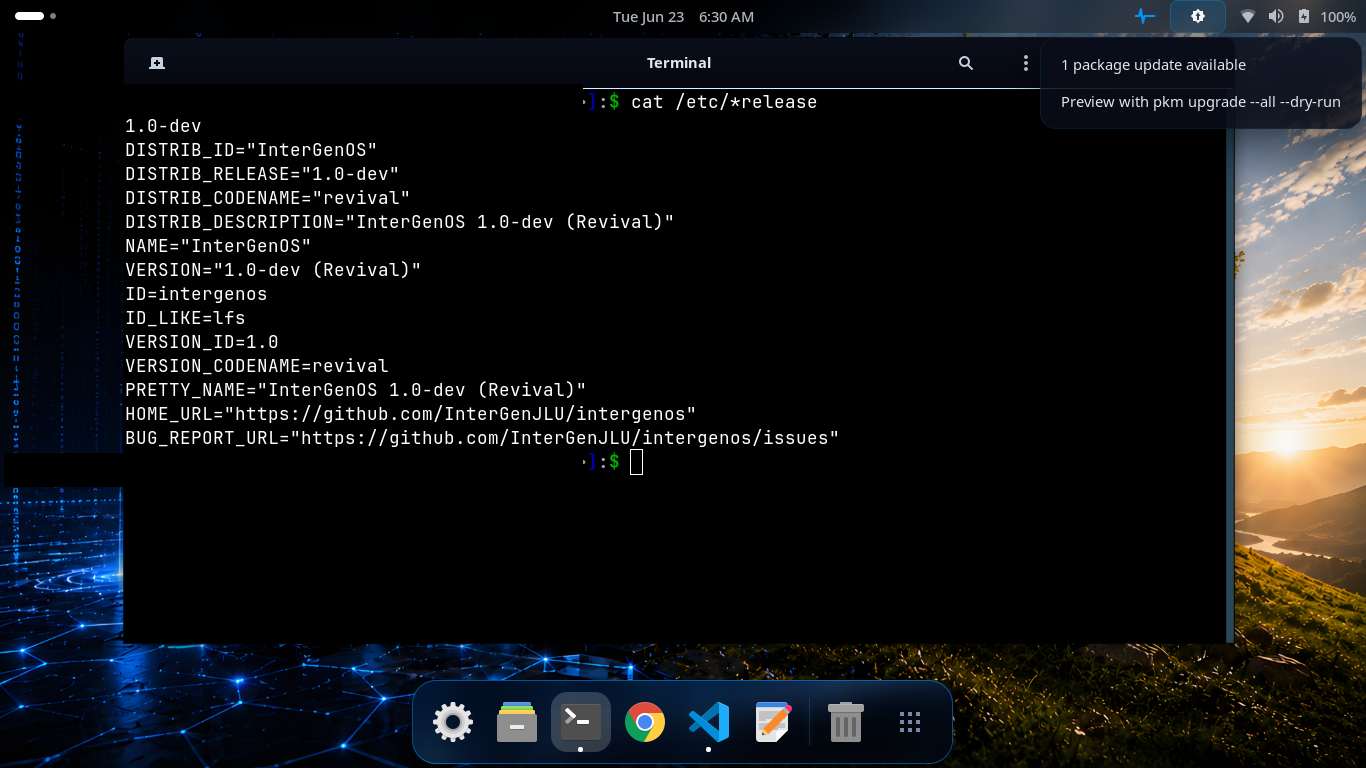
The daily check found one update and the GNOME tray indicator says so — nothing was downloaded or installed. The indicator hands you the safe preview, pkm upgrade --all --dry-run; applying the update is still your own explicit sudo pkm upgrade --all. The terminal confirms a stock InterGenOS 1.0-dev “Revival” system.
It is strictly informational and stays true to a machine you control:
- It never downloads or installs anything — it only counts. You still run
sudo pkm upgradeyourself to apply updates. - The check compares against your locally-synced index rather than fetching a new one, so it does not reach the mirror on its own; the count is as current as your last
sudo pkm sync. - It is opt-out:
sudo systemctl disable --now pkm-check-updates.timerturns it off completely, and pkm behaves as if it were never there.
How pkm Compares
pkm borrows familiar concepts but makes its own security trade-offs:
| Feature | pkm (InterGenOS) | apt (Debian/Ubuntu) | pacman (Arch) | dnf (Fedora) |
|---|---|---|---|---|
| Trust model | Signed index | Signed index (InRelease) | Signed index / per-package sigs | Signed metadata / per-package sigs |
| Auto-updates | Never | Configurable | Configurable | Configurable |
| Telemetry | None | Popcon (opt-in) | None | countme (configurable) |
| Proprietary downloads | Pauses for vendor-EULA consent | Repo separation (non-free) | User discretion | Repo separation |
The Catalog
The InterGenOS catalog is built from source across seven tiers, built in this order: toolchain, core, base, desktop, extra, compute, and ai. The package count drifts as the catalog grows; derive the live figure from the synced index rather than relying on a fixed number. The desktop tier ships GNOME 49 on Wayland today.
The ai tier carries the local, offline-first InterGen assistant — which includes a built-in security scanner, InterGen Sentinel — and the llama.cpp inference engine it runs on. Those two ship on the image; the rest of the tier is the mirror-only model-tooling stack, installable from the repository when you want it and absent from a default installation.
Further Reading
- The Repository Trust Model goes deeper on signing and provenance.
- New to the system? See the Getting Started guide.