Disk Encryption & LUKS
InterGenOS offers first-class full-disk encryption at install time. This page explains the encryption model, what you choose during installation, what the boot prompt looks like, and how to recover when something goes wrong.
Encryption-at-rest is one of the controls that makes InterGenOS a machine you understand, can modify, and can trust: your disk is yours, and its contents stay unreadable to anyone who has the disk but does not have you.
For the signed-boot story that runs around the encrypted volume, see Verified Boot.
Status note (decided 2026-08-11): the two EXPERIMENTAL unlock methods described below — TPM2-sealed unlock and FIDO2-token unlock — are not offered by the installer in this release. A functionality review (2026-08-08) found defects in both: FIDO2 enrollment can abort an install that opts in, and the TPM2 sealed key’s parent context does not survive a reboot, so automatic unlock could never outlast the first power cycle. Passphrase encryption is unaffected and fully supported. The sections below are retained as design documentation for when the corrected methods return after dedicated hardware verification.
The short version
- Full disk encryption is opt-in, not default. The Forge installer asks; you choose.
- The format is LUKS2 with a passphrase. TPM2-sealed unlock and FIDO2-token unlock are designed as EXPERIMENTAL sub-options that compose with the passphrase, but they are not offered in this release (see the status note above); the passphrase slot is always the unconditional fallback.
- Your passphrase is never written to disk outside the LUKS header slot itself, never logged, and never sent anywhere. There is no recovery-key escrow.
- The encrypted volume holds the entire root filesystem. The ESP (the small boot partition) is not encrypted, because the firmware needs to read it before any operating system is running. Secure Boot signature verification on the UKI protects that surface.
- At boot, a small InterGenOS-branded prompt asks for your passphrase. Three attempts, then a recovery shell.
- If you forget your passphrase, your data is gone. This is by design. There is no master key.
Why encrypt
Encryption-at-rest protects the data on the disk from anyone who has the disk but does not have you: a stolen laptop, a discarded SSD, a seized device, a borrowed loaner. It does not protect the data from someone who has both the disk and your passphrase, and it does not protect a running system once you have unlocked it.
The trade-off is small. You type a passphrase once per boot. In exchange, the contents of the disk are an unreadable cryptographic blob to anyone without your passphrase. Encryption is left opt-in rather than default so that users who do not want the boot prompt are not forced into it, but it is recommended for any portable device.
The encryption model
InterGenOS uses LUKS2 (Linux Unified Key Setup, version 2) as the on-disk encryption format. LUKS2 is the standard Linux full-disk-encryption format. The tooling is cryptsetup, the algorithm defaults are modern (AES-256 in XTS mode), and the key-derivation function is argon2id (memory-hard, resistant to GPU/ASIC brute-force).
A LUKS2 volume has:
- A header, at the start of the encrypted partition, holding the encryption metadata: the cipher choice, the master-key wrapping, and up to eight key slots.
- Key slots, each independently holding a wrapping of the master key by one passphrase (or by a TPM-sealed key, or by a FIDO2-derived key). You can have several unlock methods active at once; deleting one slot does not affect the others.
- The encrypted payload, which is your root filesystem.
The master key never leaves the LUKS header. Your passphrase unwraps a key slot, which yields the master key, which decrypts the payload. The passphrase itself is held only in volatile memory during the unlock, and the unlock prompt zeroes the buffer when it finishes. There is no on-disk copy of your passphrase.
The Forge install flow
When you run the Forge installer (TUI or GUI), the partitioning stage offers an Encrypt the root filesystem with LUKS2 checkbox under the “Full-disk encryption (LUKS)” heading. If you tick it:
- Forge prompts for a passphrase with a confirmation field. Both frontends enforce a non-empty value and a matching confirm field, and both surface length-and-diversity guidance, but the exact wording differs between them. The GUI shows a live strength label as you type and warns when a passphrase is under 12 characters and uses only a single character class — its baseline is roughly 12 characters with at least two character classes. The TUI presents the NIST 800-63B style guidance up front: 12+ characters with at least three character classes, or 4+ unrelated dictionary words (the diceware pattern). The guidance is a soft warning in either case: you can accept a passphrase that fires it. The installer asks you to confirm, but does not block. You can paste, but most users type. A passphrase you cannot recall under stress is not a passphrase, it is a paperweight.
- Forge formats the target partition with LUKS2 using
cryptsetup luksFormat. The argon2id KDF parameters (1 GB memory cost, 4 iterations, 4 threads of parallelism) are forced by Forge per RFC 9106’s recommendations for memory-hard KDFs, rather than relying on whatever defaults the host’scryptsetuphappens to ship. The cipher — AES-256 in XTS mode — is not forced: it is cryptsetup’s own default, which Forge leaves in place. They sit between RFC 9106’s first-recommended (t=1, m=2 GB) and second-recommended (t=3, m=64 MB) profiles, calibrated to defeat GPU-accelerated brute-force without risking out-of-memory on 4 GB systems. - Forge writes
/etc/crypttabon the target system so the boot-time FDE initramfs knows what to unlock. The entry is namedcryptrootand references the partition byUUID=. - Forge writes
/etc/fstabwith the unlocked device-mapper node (/dev/mapper/cryptroot) as the root mount source, not the raw partition. - The kernel post-install hook bundles the FDE initramfs into the UKI. Because of the composition with Secure Boot (see below), the unlock prompt lives inside the same signed envelope as the kernel.
The passphrase you type is held only in memory while the install runs. It is piped to cryptsetup via stdin (never on the command line, never in argv), zeroized after use, and cleared from the installer’s state on both the success and failure paths. No copy is written to disk except in the LUKS header slot itself.
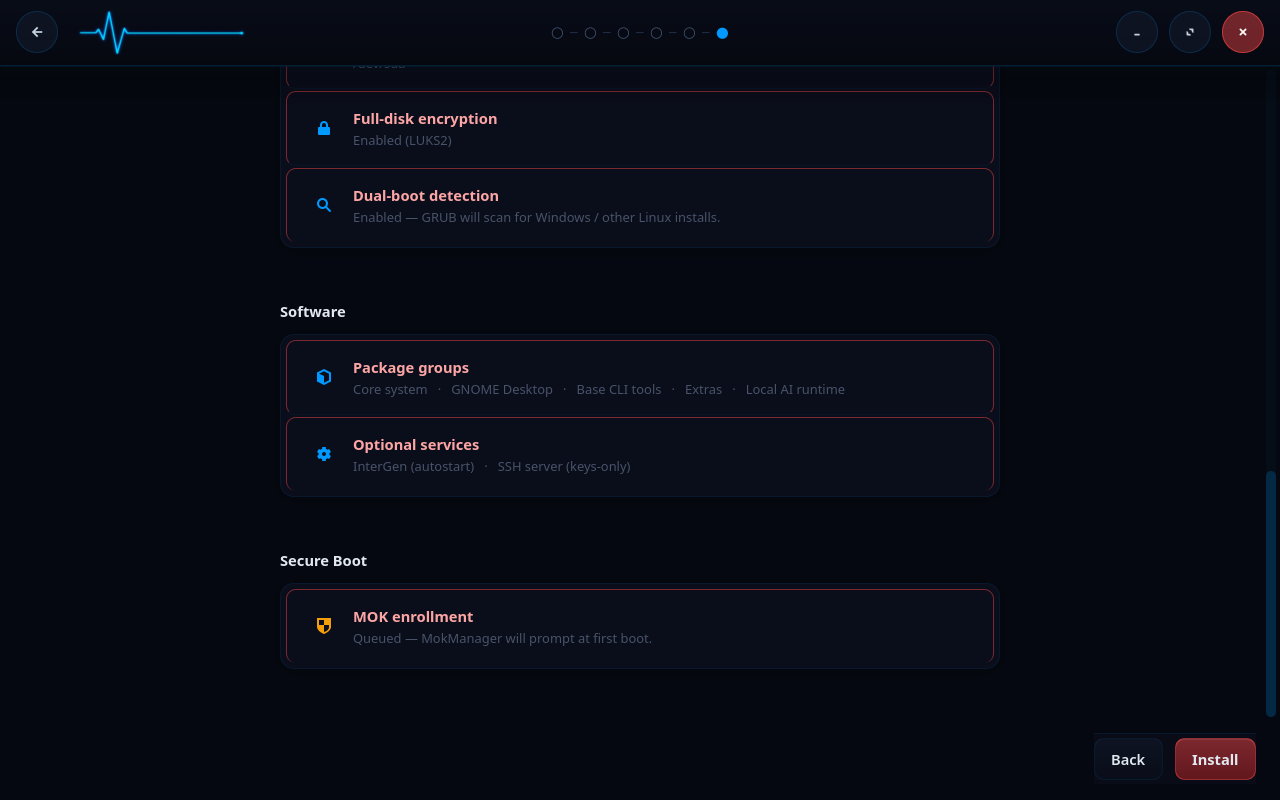
Before it writes anything, Forge shows you a summary of what it is about to do — the encryption choice and the queued MOK enrollment among them:
The two sections that follow describe unlock methods that are not offered in this release (see the status note at the top of this page); they are retained as design documentation. As designed, two EXPERIMENTAL unlock methods compose with the passphrase: TPM2-sealed unlock (a sub-checkbox under the encryption opt-in) and FIDO2-token unlock (a separate sub-checkbox). Both add an additional LUKS key slot at install time alongside the passphrase slot; the passphrase is never replaced, only augmented. The TPM2 sub-checkbox is greyed out with a tooltip if your hardware does not expose a TPM (/dev/tpmrm0 absent) or if the live ISO is missing the static TPM2 tools. The FIDO2 sub-checkbox is always visible when LUKS is selected; the token does not need to be plugged in when the checkbox appears, only when enrollment runs (you will be prompted to plug it in and touch it).
EXPERIMENTAL: TPM2-sealed unlock
If you tick Unlock with TPM2 (EXPERIMENTAL), Forge seals a fresh 32-byte random key against the current measured-boot state, adds that key as an additional LUKS slot, and writes the sealed-blob triplet (primary.ctx, secret.pub, secret.priv) to the ESP under /intergen/tpm2/. The seal is bound to a PCR0 + PCR7 policy: PCR0 tracks the firmware (BIOS/UEFI code), and PCR7 tracks Secure Boot policy state (the db/dbx/KEK/MOK enrollment status). On normal boots the system unlocks automatically without prompting for a passphrase.
This is flagged EXPERIMENTAL because the failure modes are subtle. A firmware update changes PCR0; a signed kernel update that touches your shim/MOK state can change PCR7; a Secure Boot reconfiguration changes PCR7. Any of these invalidates the seal, and the boot falls through to the next configured method (FIDO2, if enrolled) and ultimately to the passphrase prompt. The cost of thinking you are TPM-unlocked and then suddenly being prompted is real, so this is held back from a general recommendation until it has more field validation.
The sealed blob written to the ESP is not a secret: without the specific TPM that performed the seal (and the same PCR0/PCR7 state), the blob is useless. You can copy it for backup if you want, but it cannot be unsealed on any other machine. The passphrase slot remains untouched; if the TPM rejects the unseal, the boot prompt asks for the passphrase exactly as in the passphrase-only flow.
EXPERIMENTAL: FIDO2-token unlock
If you tick Unlock with FIDO2 token (EXPERIMENTAL), Forge enrolls a credential on a FIDO2 security token (YubiKey, Solo, Nitrokey, and similar) plugged in during the install. Enrollment runs in two interactive steps:
- Generate credential:
fido2-cred -Mcreates a new credential on the token. You will be prompted to touch the token when it blinks. - Derive unlock key: a fresh 32-byte random nonce is generated,
fido2-assert -G --hmac-secretis invoked with that nonce as salt, and the token returns an HMAC output bound to the credential and the nonce. You will be prompted to touch the token a second time. The HMAC is added as an additional LUKS slot.
Forge writes cred_id and stored_nonce to the ESP under /intergen/fido2/. Neither file is a secret: without the physical token, the credential ID and the salt are useless. The relying-party ID is intergenos. At boot, the same fido2-assert call against the same nonce yields the same HMAC bytes, which unlock the slot.
This is flagged EXPERIMENTAL for the same family of reasons as the TPM2 path: a lost token, a firmware update on the token that rotates the underlying credential storage, or a token swap all invalidate the slot. The passphrase slot stays in the LUKS header for fallback.
The boot-time flow
When an encrypted InterGenOS system boots, the path looks like this:
   Firmware (UEFI)
        |
        |  Secure Boot signature verification on the UKI
        v
   Signed UKI                       (kernel + FDE initramfs + cmdline,
        |                            bundled and signed by your local MOK)
        |
        v
   Kernel hands off to /init
        |
        v
   InterGenOS - encrypted root unlock
        |
        |  read /etc/crypttab options for "tpm2" / "fido2"
        |  mount ESP read-only (by IGOS_ESP label, fallback scan)
        v
   Try TPM2 unlock (if enrolled + /dev/tpmrm0 present)
        |  unseal against PCR0+PCR7 policy
        |  -> pipe unsealed bytes to cryptsetup --key-file=-
        |  on any failure: fall through
        v
   Try FIDO2 unlock (if enrolled + tools available)
        |  wait up to 30s for the token to enumerate
        |  fido2-assert -G --hmac-secret against stored nonce
        |  -> pipe HMAC to cryptsetup --key-file=-
        |  on any failure: fall through
        v
   Passphrase prompt (always the final fallback)
   Enter passphrase: _              (three attempts; the prompt runs
        |                            inside the signed UKI envelope)
        |  cryptsetup open
        v
   /dev/mapper/cryptroot mounted
        |
        |  switch_root
        v
   systemd PID 1 - normal boot continues
If neither TPM2 nor FIDO2 was enrolled, the chain skips straight to the passphrase prompt; the unlock path is identical to a passphrase-only install. The prompt you see in that case is plain text:
  InterGenOS - encrypted root unlock

Enter passphrase for /dev/disk/by-uuid/<uuid>:
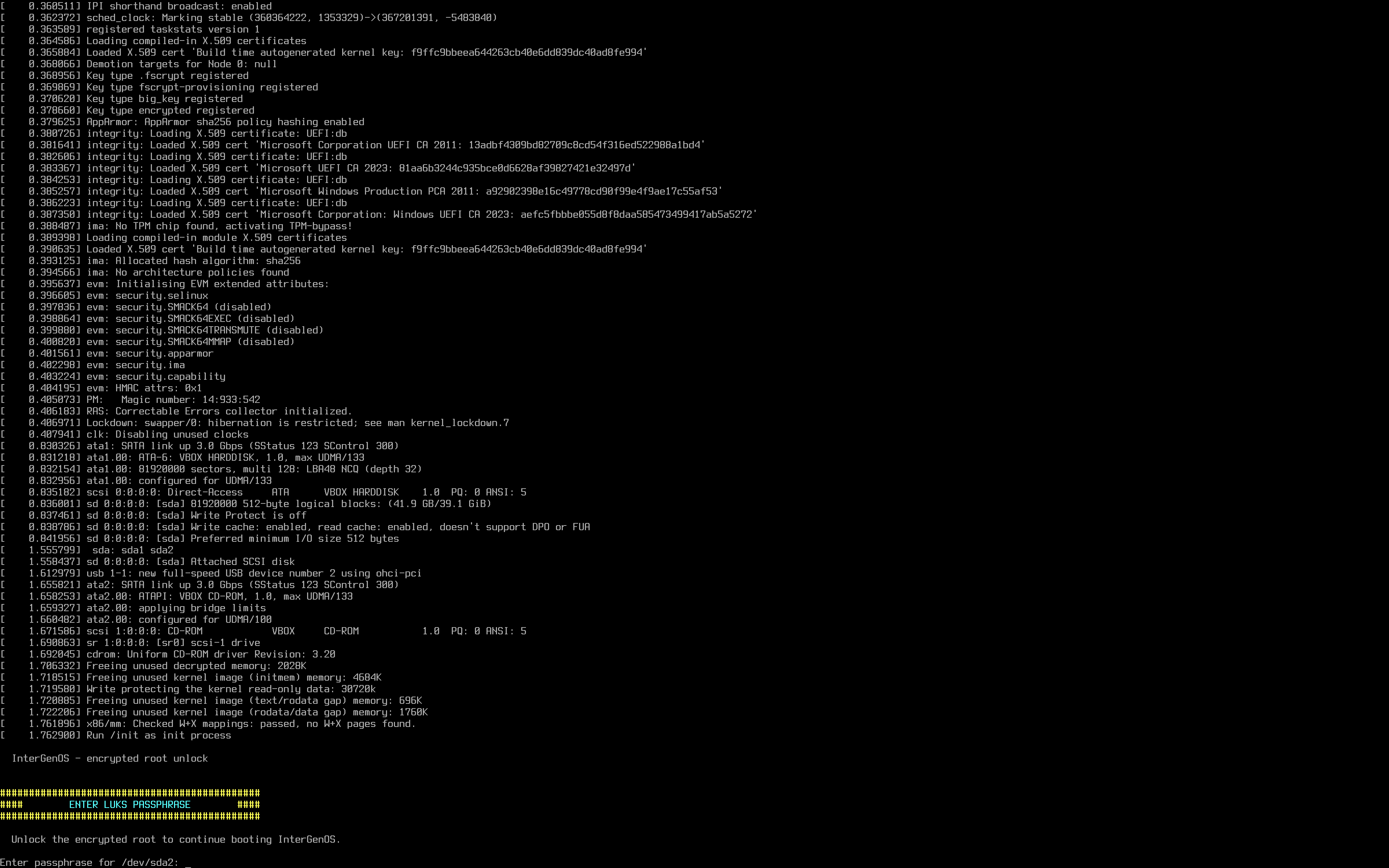
The prompt is set off by a bordered banner deliberately, so it is unmistakable in the wall of early-boot kernel messages rather than scrolling past unnoticed. Three wrong attempts drops you into a recovery shell with cryptsetup available. From there you can retry the unlock manually, inspect /etc/crypttab, or reboot.
The FDE initramfs is tiny: a static cryptsetup binary, a static busybox, the dm_crypt and ext4 kernel modules, and the storage drivers needed to see your disk. When TPM2 or FIDO2 unlock is enrolled, the initramfs also carries the static TPM2 / FIDO2 tools and the corresponding kernel modules (tpm/tpm_tis/tpm_crb for TPM2; usbhid/hid_generic for FIDO2). It does no logging to disk, no telemetry, and no network. Its only job is to attempt the unlock chain, mount the root filesystem, and hand off to systemd.
Debugging the unlock chain
The FDE init script emits journal-grep-friendly prefixes when running EXPERIMENTAL methods. From a recovery shell or after boot, you can correlate each attempt by searching for the prefix:
| Prefix | What it means |
|---|---|
[fde-init][EXPERIMENTAL TPM2] | TPM2 unlock attempt. Outcomes include skipping (no /dev/tpmrm0, no tools, or no sealed blob on ESP), attempting unlock via sealed key (PCR0+PCR7), tpm2_load failed, a tpm2_unseal | cryptsetup failure (PCR drift or broken seal), or unlock succeeded. |
[fde-init][EXPERIMENTAL FIDO2] | FIDO2 unlock attempt. Outcomes include skipping (no tools or no metadata), attempting unlock - plug your security token + touch when it blinks, no FIDO2 token detected within 30s, a specific diagnostic from the unlock pipeline, or unlock succeeded. |
[fde-init] (no EXPERIMENTAL suffix) | Passphrase prompt path, the recovery-shell drop, and root-mount errors. |
These messages appear on the console during early boot only — the FDE initramfs runs before systemd-journald exists, and its messages are not kernel messages, so they are not retrievable from the journal afterwards. Watch the screen during boot for them. What the journal does retain from the unlock is the kernel’s own record: journalctl -b -k | grep -i 'device-mapper\|dm-crypt'.
Composition with Secure Boot
The encrypted-root and signed-boot stories are designed to compose. They do not interact at runtime except through the FDE initramfs being part of the signed UKI.
A UKI is a single signed file that bundles the kernel, the initramfs, and the kernel command-line. On a non-encrypted install, the UKI’s bundled initramfs is minimal or empty: the kernel-builtin storage drivers, a PARTUUID= rootspec, and rootwait are sufficient. On an encrypted install, the UKI’s bundled initramfs is the FDE initramfs: the same script that prompts you for the passphrase is part of the same signed envelope as the kernel.
The practical consequences:
- With Secure Boot enforcement enabled, an attacker cannot substitute a fake unlock prompt that captures your passphrase: the prompt code is inside the signed UKI, and tampering with it means the firmware refuses to load it. This protection is exactly as strong as that enforcement — with Secure Boot off, nothing at the firmware level rejects a tampered image, so the signature is verifiable but not enforced.
- A kernel upgrade rebuilds the UKI with the new kernel and the same FDE initramfs, signed with your machine’s MOK. The unlock experience is identical across kernel upgrades.
- If UKI signing fails on a kernel upgrade (ESP full, MOK missing, signing-key error), the system falls back to GRUB loading the bare vmlinuz directly. On an encrypted install you would need to supply an initramfs to that recovery path manually; see Recovery below.
For the full signed-boot model, see Verified Boot.
Validated together
This composition is not just designed, it is validated. InterGenOS has been installed onto a LUKS2-encrypted target and booted to the desktop under enforced Secure Boot — the encrypted-root unlock prompt itself appearing under Secure Boot enforcement, the strictest combination of the two controls. The encrypted install runs every installer phase to completion, including the bootloader stage:
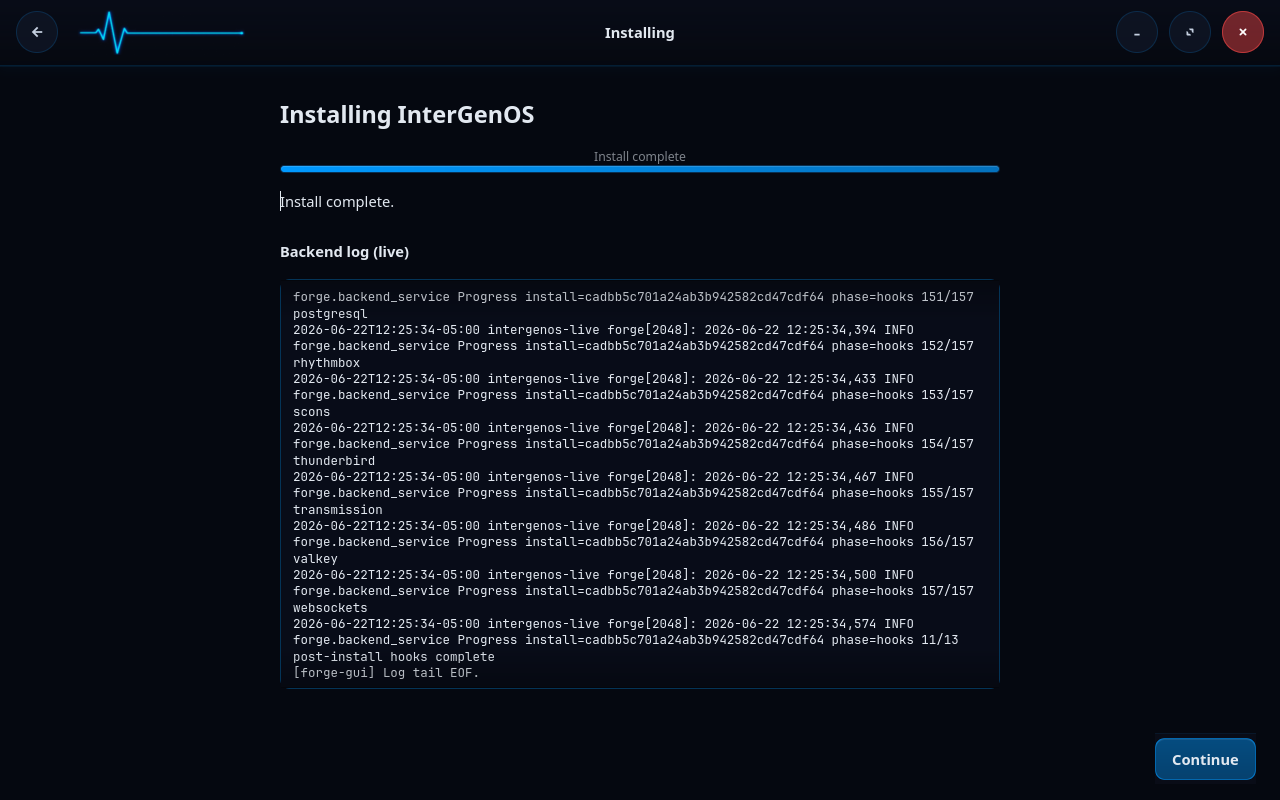
…and at boot, the signature gate and the encryption gate run in series with no conflict: the firmware verifies the signed chain (shim → GRUB → UKI), the signed UKI’s FDE initramfs prompts for your passphrase, and only then does the encrypted root mount.
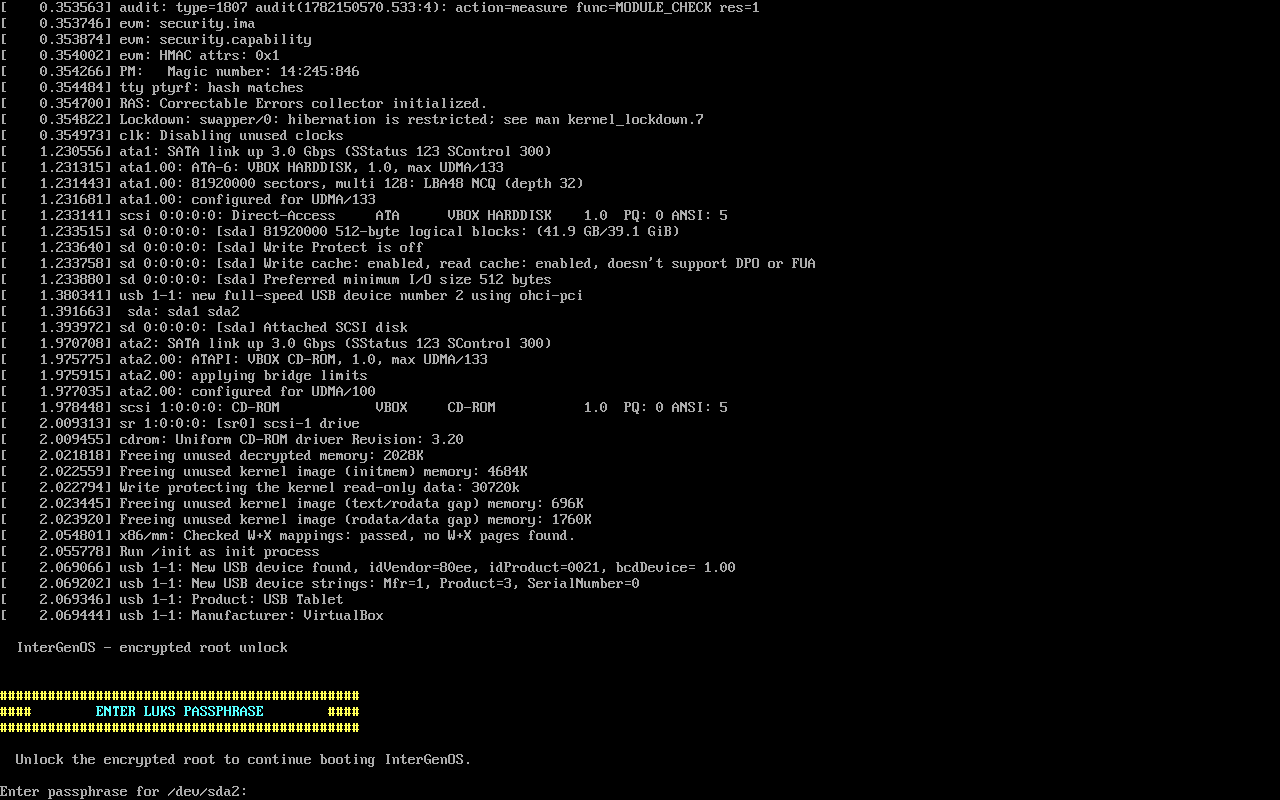
You can confirm the full matrix yourself — mokutil --sb-state: enabled, the enrolled CN=InterGenOS Machine Owner Key, the LUKS2 argon2id root over an unencrypted ESP, sig_enforce=Y — on the Security Verification page.
What is and is not protected
Encrypted at rest:
- The entire root filesystem, including
/home,/var,/etc,/root, swap (if you put it on the encrypted volume), and any other partition you place inside the LUKS container. - Anything written to disk by any program once the system is running and the volume is unlocked.
Not encrypted:
- The ESP (the small
/boot/efipartition). The firmware reads this before any operating system runs, so it cannot be encrypted. Its integrity is protected by Secure Boot signature verification on the UKI, not by encryption. - The LUKS header itself is on disk and visible. It tells an observer that the partition is LUKS-encrypted and what cipher is in use. It does not reveal anything about the payload.
- A running system. Once you have entered your passphrase and the volume is unlocked, the master key lives in kernel memory and the filesystem is readable to any process with the right permissions. Encryption-at-rest does not replace the operating system’s process isolation, user permissions, or AppArmor confinement.
If your threat model includes someone with physical access to your machine while it is running, full disk encryption is not the control you are looking for. You want a screen lock or a powered-off machine.
Recovery
Most of the time you will never think about any of this. When something goes wrong, you have several recovery paths.
I forgot my passphrase
Your data is gone. There is no master key, no recovery-key escrow, no back door, and no service that will recover it. This is intentional: a recovery channel that could be used by you is a channel that could be used by an attacker.
If this happens, boot a live ISO and reinstall. Back up early and often is the only mitigation.
I want to add a second passphrase
LUKS2 supports up to eight key slots. From a running system, as root:
cryptsetup luksAddKey /dev/disk/by-uuid/<uuid>
You will be prompted for an existing passphrase (to unwrap the master key) and then for the new one. The new passphrase will work on the next boot.
I want to remove a key slot
cryptsetup luksRemoveKey /dev/disk/by-uuid/<uuid>
You will be prompted for the passphrase belonging to the slot you want to remove. The other slots are untouched.
I want to back up the LUKS header
The LUKS header is a small region at the start of the encrypted partition. If it is corrupted (disk-level damage at exactly the wrong offset, or an accidental dd to the wrong device), the payload becomes unrecoverable even with the correct passphrase, because the encryption metadata lives in the header.
Back it up to a separate medium:
cryptsetup luksHeaderBackup /dev/disk/by-uuid/<uuid> \
    --header-backup-file /path/to/external/header.bin
Store the backup offline. Anyone with the backup file and your passphrase can decrypt your disk; treat it accordingly.
To restore:
cryptsetup luksHeaderRestore /dev/disk/by-uuid/<uuid> \
    --header-backup-file /path/to/external/header.bin
UKI signing failed on a kernel upgrade and I cannot boot the encrypted root
The kernel post-install hook preserves the GRUB-loads-vmlinuz path as a recovery fallback. From the GRUB recovery entry, you can boot the bare vmlinuz, supply the FDE initramfs as an initrd= argument, and unlock as normal. Check /var/log/intergen-kernel-postinstall.log (and the troubleshooting table below) for the underlying signing-failure messages before retrying the post-install hook.
Boot drops me to the FDE recovery shell
Three failed passphrase attempts (or a missing /etc/crypttab, or a missing LUKS volume) drop you to a small busybox shell with cryptsetup available. From there you can:
- Retry the unlock manually:
cryptsetup open /dev/disk/by-uuid/<uuid> cryptroot, thenmount /dev/mapper/cryptroot /newroot, thenexec switch_root /newroot /sbin/init. - Reboot: type
reboot -f(the standardrebootcommand is not available pre-systemd). - Inspect the partition table:
ls /dev/disk/by-uuid/.
The recovery shell has no network access and no logs. It is intentionally minimal.
Troubleshooting
| Symptom | Likely cause | Fix |
|---|---|---|
| Boot prompt asks for passphrase but every attempt fails | Wrong passphrase, or keyboard layout differs at boot from inside the OS | Confirm the layout. The FDE initramfs uses the US-QWERTY layout by default; if your passphrase contains layout-sensitive characters, type the QWERTY equivalents. |
| Boot drops straight to the FDE recovery shell with “no LUKS volume specified” | /etc/crypttab was not written, or the install did not complete the encryption stage | From the recovery shell, inspect /etc/crypttab with cat /etc/crypttab. If empty, the install did not enable encryption; boot a live ISO and reinstall. |
| Boot drops to the FDE recovery shell with “LUKS volume not found after 30s wait” | The disk did not enumerate in time (failing drive, USB-attached storage, slow RAID controller init) | From the recovery shell, run ls /dev/disk/by-uuid/ to see what is visible. If the volume appears, retry cryptsetup open manually. If not, the disk is the problem. |
| TPM2-sealed unlock falls through to passphrase | PCR0 or PCR7 has changed (firmware update, Secure Boot reconfiguration, shim/MOK update) | Enter the passphrase to boot. The system continues to unlock normally with the passphrase slot; re-enrolling TPM2 against the new PCR state restores automatic unlock. The specific outcome appears in the [EXPERIMENTAL TPM2] line on the boot console (console-only — it does not reach the journal). |
| FIDO2 unlock does not detect the token | Token not plugged in early enough, or token battery dead | The FDE initramfs waits up to 30 seconds for the device to enumerate. Plug the token in before boot. For battery-dead tokens, fall back to the passphrase. The outcome appears in the [EXPERIMENTAL FIDO2] line on the boot console (console-only). |
cryptsetup luksAddKey says “No key available with this passphrase” | The passphrase you entered does not match any existing slot | Try other passphrases you have set. If none work, you are in the forgot-passphrase case. |
| The ESP filled up on a kernel upgrade and the new UKI was not written | UKI generation logs ESP-full and skips; the previous kernel’s UKI remains the default | Use pkm to remove the old kernel package to free space, then re-run the post-install hook for the current kernel. See /var/log/intergen-kernel-postinstall.log for the underlying messages. |
Further reading
- Verified Boot — the signed-boot story that wraps the encrypted-unlock story.
- Forge Installer Guide — the install walkthrough that reaches the encryption opt-in step in context.
- Recovery — broader recovery procedures for an installed system.
- FAQ — common questions, including encryption.