Verified Boot & Secure Boot
InterGenOS builds a fully signed boot chain and signs every kernel image it produces. Being precise about what that buys you matters more than a reassuring headline, so this page is exact about what is signed versus what is enforced on the hardware InterGenOS ships on today.
Security is not first. It is only — and “only” includes being honest about the current enforcement posture rather than implying a guarantee the shipped configuration does not yet provide.
The 30-second version
- InterGenOS produces a signed boot chain: a Microsoft-signed shim (Fedora’s pre-signed shim) → InterGenOS GRUB → a signed Unified Kernel Image (UKI). Those artifacts are built, signed, and shipped.
- On the current target hardware, UEFI Secure Boot is left disabled by default, and no Machine Owner Key (MOK) is enrolled. The signatures are present and verifiable, but firmware does not enforce them on a default install today. Secure Boot has been validated end to end — now on real hardware (an ASUS ROG laptop with a GeForce RTX 3070 Ti), not just in an enforcing UEFI VM — with an enrolled MOK the chain boots under enforced Secure Boot, including with full-disk encryption active (a LUKS2-encrypted root and enforced Secure Boot together, the strictest combination). Now that GRUB carries its SBAT revocation record, the chain Secure-Boots with no hand-patching. The default install still ships it off — signed, not yet firmware-enforced — and turning it on is the one-time MOK enrollment described below.
- The release signing key never leaves InterGenOS hardware. The live ISO and install-mode images are signed offline by a release subkey on a hardware token; that key never touches your machine.
- The live ISO’s read-only system image is sealed with dm-verity. The installed root filesystem is an ordinary
ext4volume (referenced byPARTUUID, or unlocked as/dev/mapper/cryptrooton an encrypted install), not a dm-verity device. - Every kernel you install after the original ISO is rebuilt into a UKI and signed with a per-machine MOK, so the signing machinery is in place for when Secure Boot is enabled.
- If a kernel signing step fails, GRUB still offers a known-good fallback so you never end up with a system that cannot boot.
What is signed, and what is enforced
It is worth separating two things that are easy to conflate:
- Signed — the artifact carries a cryptographic signature you (or the firmware) can verify. InterGenOS signs the shim chain, GRUB, and every kernel UKI.
- Enforced — the firmware refuses to run anything whose signature does not validate. Enforcement requires UEFI Secure Boot to be on and the relevant key (Microsoft’s CA via shim, plus your MOK) to be trusted.
On a default install, the chain is signed but not firmware-enforced, because Secure Boot is disabled and no MOK is enrolled. What that gives you today:
- Verifiable install media. The live ISO and install images are signed offline; you can verify them before you ever install.
- A sealed live image. dm-verity over the live ISO’s read-only squashfs means a tampered install medium cannot present itself as genuine.
- A signing path that is ready to enforce. Because every installed kernel is already built into a signed UKI, enabling Secure Boot on capable hardware (and enrolling the MOK) turns the existing signatures into enforced ones without re-architecting anything.
What it does not give you on a default install is a hardware-rooted guarantee that only signed code boots — that is what enabling Secure Boot adds.
The boot chain
flowchart TB
FW["Firmware (UEFI)"] -->|" trusts Microsoft 3rd-party CA <br/> (only when Secure Boot is ON) "| SHIM["Microsoft-signed shim<br/>the live ISO reuses Fedora's pre-signed shim"]
SHIM -->|" trusts the InterGenOS vendor cert <br/> loaded as your MOK "| GRUB["InterGenOS GRUB<br/>release-key-signed on the ISO + install media,<br/>MOK-signed for the GRUB written to your disk"]
GRUB -->|" verifies the UKI signature "| UKI["InterGenOS UKI<br/>vmlinuz + initramfs + cmdline, signed as one Authenticode binary"]
UKI -->|" kernel handoff "| US["InterGenOS userspace"]
A Unified Kernel Image (UKI) is a single signed file that bundles the kernel, the initramfs, and the kernel command line. Signing the UKI envelope signs all three at once; nothing inside can be swapped without breaking the signature. The chain above is enforced from the firmware downward only when Secure Boot is enabled; with it disabled, the same artifacts are present but the firmware does not gate on them.
The live ISO and install media use UKIs signed by the InterGenOS release subkey on an offline signing workstation. Once you install to disk, every kernel you install or upgrade is rebuilt into a UKI on your machine and signed with your machine’s MOK.
The GRUB menu
At boot, GRUB presents the default kernel entry; the recovery entry — and any older kernels retained after later kernel upgrades — lives under the Advanced options submenu rather than on the top-level menu (a fresh install has exactly one kernel, so there are no older entries yet). GRUB is itself signed and is configured to verify the UKIs it loads.
How the live system image is sealed (dm-verity)
dm-verity applies to the live ISO, not to the installed root filesystem. Keeping that distinction straight matters.
When a release is assembled, the read-only system image (a squashfs) is built and a verified-integrity hash tree (dm-verity) is generated over it. The root hash of that tree is written into the signed kernel command line carried inside the live image’s UKI. Because the UKI signature covers the command line, the root hash is itself signed. The result is that the live medium cannot be tampered with and still present a valid signature.
When you install to disk, Forge lays down a conventional ext4 root filesystem, and the installed system boots with root=PARTUUID=… (or root=/dev/mapper/cryptroot on an encrypted install, unlocked by the FDE initramfs first). The installed root is not a dm-verity device; its integrity rests on the signed UKI (when Secure Boot is enforced) and on pkm’s per-file SHA-256 records, which pkm verify can re-check at any time.
Signing only appends a signature; it never alters the payload. Before each signing, the inputs are re-staged and their root hashes are re-checked against the freshly built system image, and the signed outputs are verified afterward.
What is a MOK?
A Machine Owner Key is a per-machine signing key, generated on your own machine, that firmware can be made to trust by enrolling it via MokManager. On a default (Secure-Boot-off) install it is generated and used to sign your UKIs; enrolling it via MokManager is what makes the firmware enforce it — see Enabling Secure Boot for the validated enrollment flow.
It exists for two reasons:
- Your machine signs the kernels you install. When you install a new kernel, InterGenOS rebuilds the UKI and signs it with your MOK. The InterGenOS release key never sees the kernels you install; it only signs the live ISO and install media that ship from InterGenOS.
- You can trust your own third-party drivers. If you build out-of-tree modules (for example, proprietary GPU drivers via DKMS), they can be signed by your MOK so that, on a Secure Boot system, they load without disabling enforcement.
The MOK is yours. It lives under /var/lib/intergen/mok/ on the installed system (mok.key, mok.crt, and mok.der). If you reinstall, Forge generates a fresh MOK.
The Forge install flow
When you run the Forge installer (TUI or GUI), the bootloader stage does the following without asking further questions:
- Generates a per-machine MOK keypair (RSA-2048, matching the kernel module-signing default):
/var/lib/intergen/mok/mok.key— the private key/var/lib/intergen/mok/mok.crt— a PEM-format X.509 cert, used bysbsignfor UKI signing/var/lib/intergen/mok/mok.der— a DER-format X.509 cert, the binary form MokManager wants for enrollment
- Ensures the UKI tooling is present —
ukify(from the systemd tooling) andsbsign(fromsbsigntool) are ordinary installed packages, so the kernel package’s post-install hook can build and sign UKIs at install or upgrade time. - Installs an initial UKI built from the kernel the installer just dropped on the system, signed with the freshly generated MOK, at
/boot/efi/EFI/Linux/intergenos-<kernel-version>.efi. - Configures a recovery boot entry that loads the bare vmlinuz with no UKI envelope, as a fallback path if a UKI ever fails to sign or boot.
On hardware where you intend to run with Secure Boot enabled, you additionally enroll the MOK via MokManager (below). On the default configuration, Secure Boot is left off and that enrollment step is skipped.
For the full installer walkthrough, see the Forge installer guide.
Enabling Secure Boot
Secure Boot has been validated on InterGenOS end to end — on real hardware (an ASUS ROG laptop with a GeForce RTX 3070 Ti) as well as in an enforcing UEFI virtual machine: with the boot chain complete, the system boots under enforced Secure Boot, anchored to your own Machine Owner Key, with the kernel in integrity lockdown and refusing unsigned modules. It has been validated in the strictest configuration as well — with full-disk encryption active, so the LUKS unlock prompt itself appears under enforced Secure Boot, the encrypted root and the signature gate working together. You can see that proof — mokutil --sb-state: enabled, the enrolled CN=InterGenOS Machine Owner Key, sig_enforce=Y, a LUKS2-encrypted root — on the Security Verification page.
Two practical notes on availability:
- The chain Secure-Boots natively. The Microsoft-signed shim InterGenOS reuses requires every component it loads to carry an SBAT revocation record. The UKI already carried one; GRUB now carries its SBAT record too, so the signed chain boots under enforced Secure Boot with no hand-patching. That SBAT gate is exactly what makes Secure Boot mean something: a GRUB that predates the record is refused at the shim stage rather than silently allowed — fail-closed enforcement you can watch happen, not just a checkbox. (Some firmware, especially on OEM laptops, makes the Secure Boot toggle read-only outside Setup Mode; InterGenOS runs fine with it off, and enabling it is optional.)
- Enabling it is a one-time enrollment. Forge stages your MOK and a one-time enrollment password during install (with Secure Boot off). On the next boot the firmware runs MokManager so you can enroll that key; once enrolled, you turn Secure Boot on in firmware and the chain validates.
Enrolling your key with MokManager
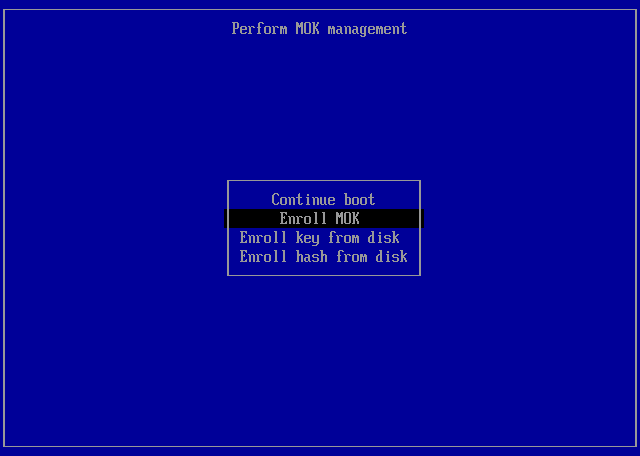
MokManager is a small blue-on-black firmware utility. The sequence:
-
Perform MOK management → Enroll MOK.
-
View the key, then Continue — review the certificate about to be trusted; its subject reads
CN=InterGenOS Machine Owner Key.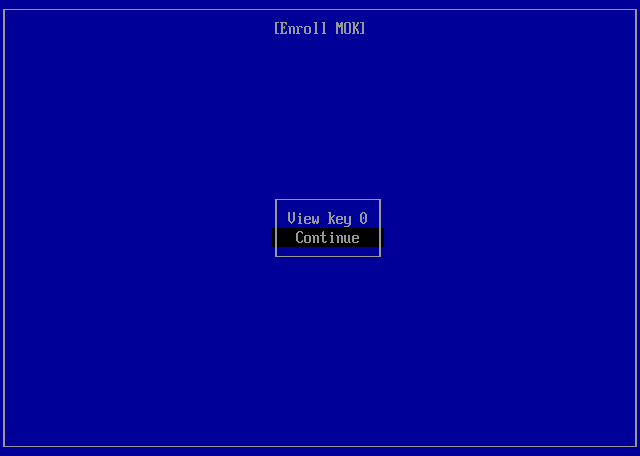
-
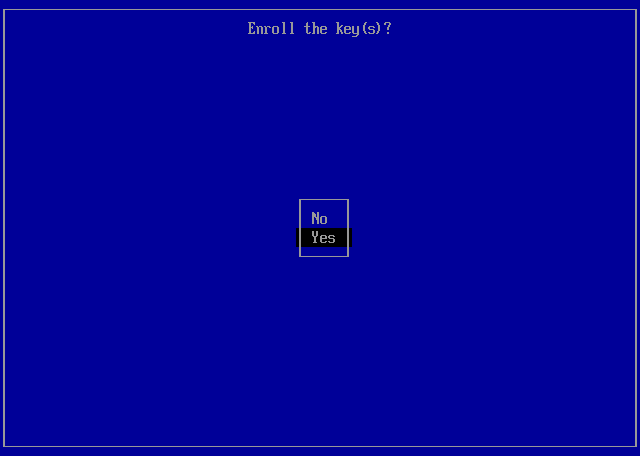
Enroll the key(s)? → Yes, then enter the one-time password Forge set during install.
-
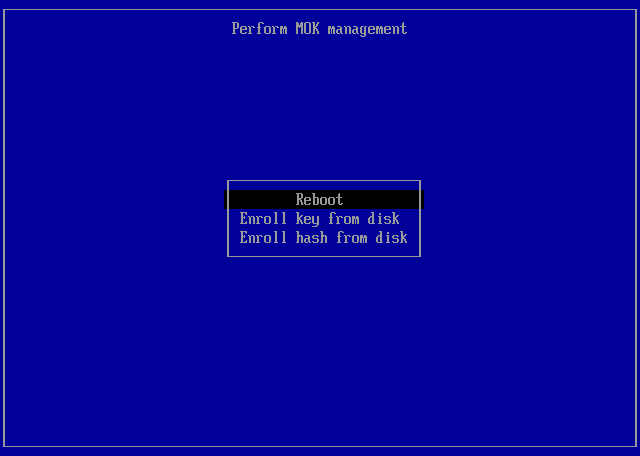
Reboot. The menu returns with your key enrolled — choose Reboot.
After enrollment, with Secure Boot enabled in firmware, UKIs signed with your key load without further prompts, and unsigned or wrong-key images are refused. Until you enroll and enable Secure Boot, the system boots the signed UKI without firmware enforcement.
Proof: booted under enforced Secure Boot
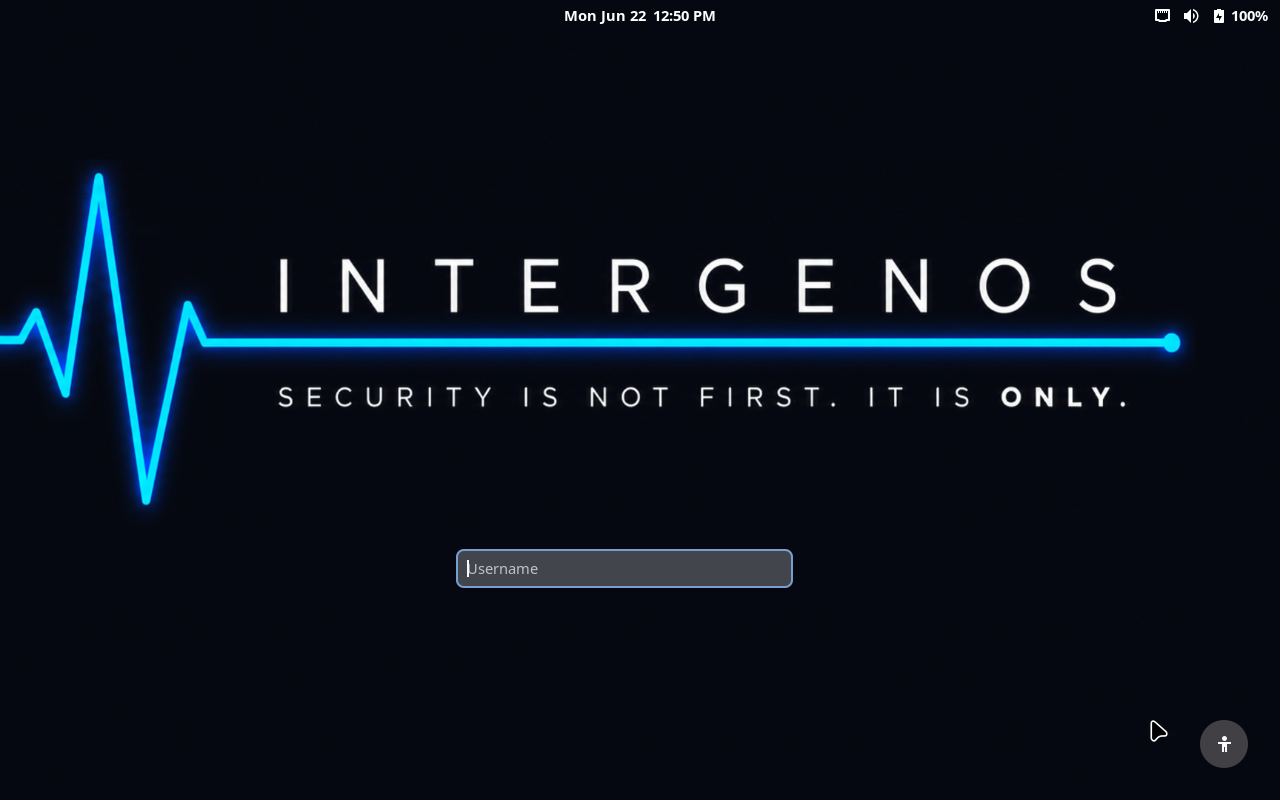
This is the whole chain working under enforced Secure Boot — the branded login, reached only after the shim verified GRUB, GRUB verified the signed UKI, and (on an encrypted install) the LUKS prompt unlocked the root, with the firmware refusing anything unsigned at every step:
Enforcement here is real, not nominal. A GRUB that predates the SBAT record is rejected by the shim under enforced Secure Boot — the firmware refuses to run it rather than booting it anyway:
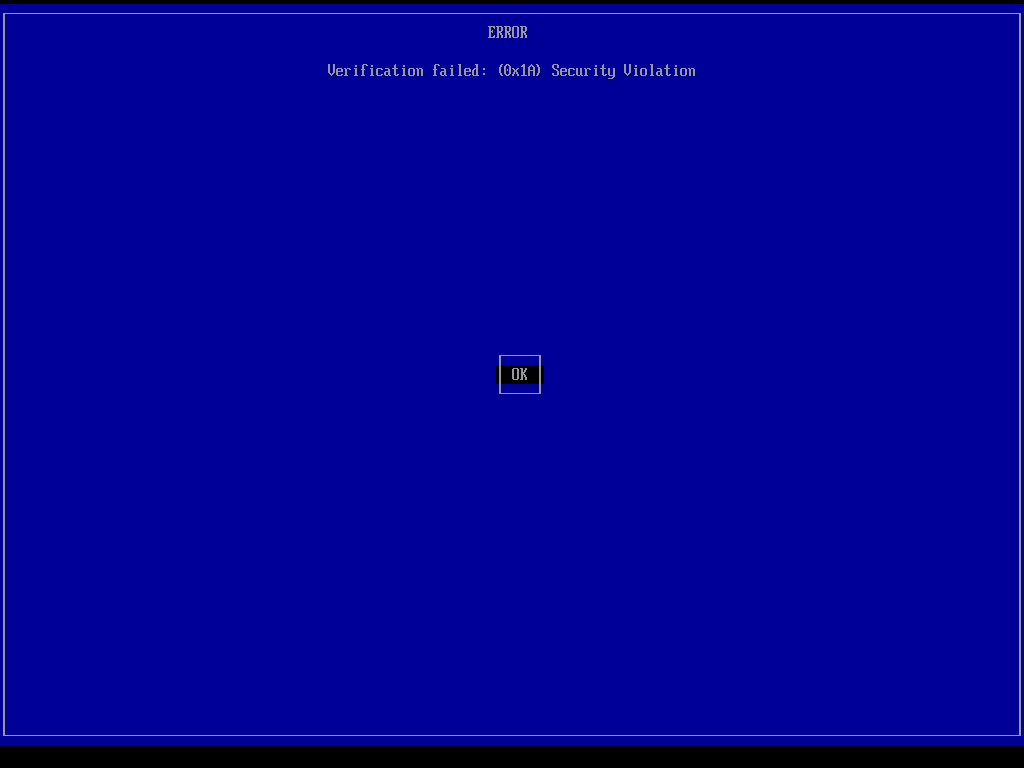
Same firmware, same enforcement, two outcomes: an earlier GRUB without the SBAT record is correctly refused (a 0x1A Security Violation); the current chain, with GRUB carrying its SBAT record and signed by your MOK, is trusted and boots. That difference is what a working Secure Boot looks like — it has to be able to say no.
The same chain boots encrypted or plain
Secure Boot was validated on both install types, because the signed boot path is the same either way: GRUB reads its MOK-signed, SBAT-carrying image from the unencrypted ESP regardless of what the root filesystem is. The only difference is the disk topology — an encrypted install unlocks a LUKS2 root behind the passphrase prompt; a plain install mounts an ordinary ext4 root directly. Both reach the desktop under enforced Secure Boot with the identical green matrix (sig_enforce=Y, integrity lockdown, a clean pkm verify --all).
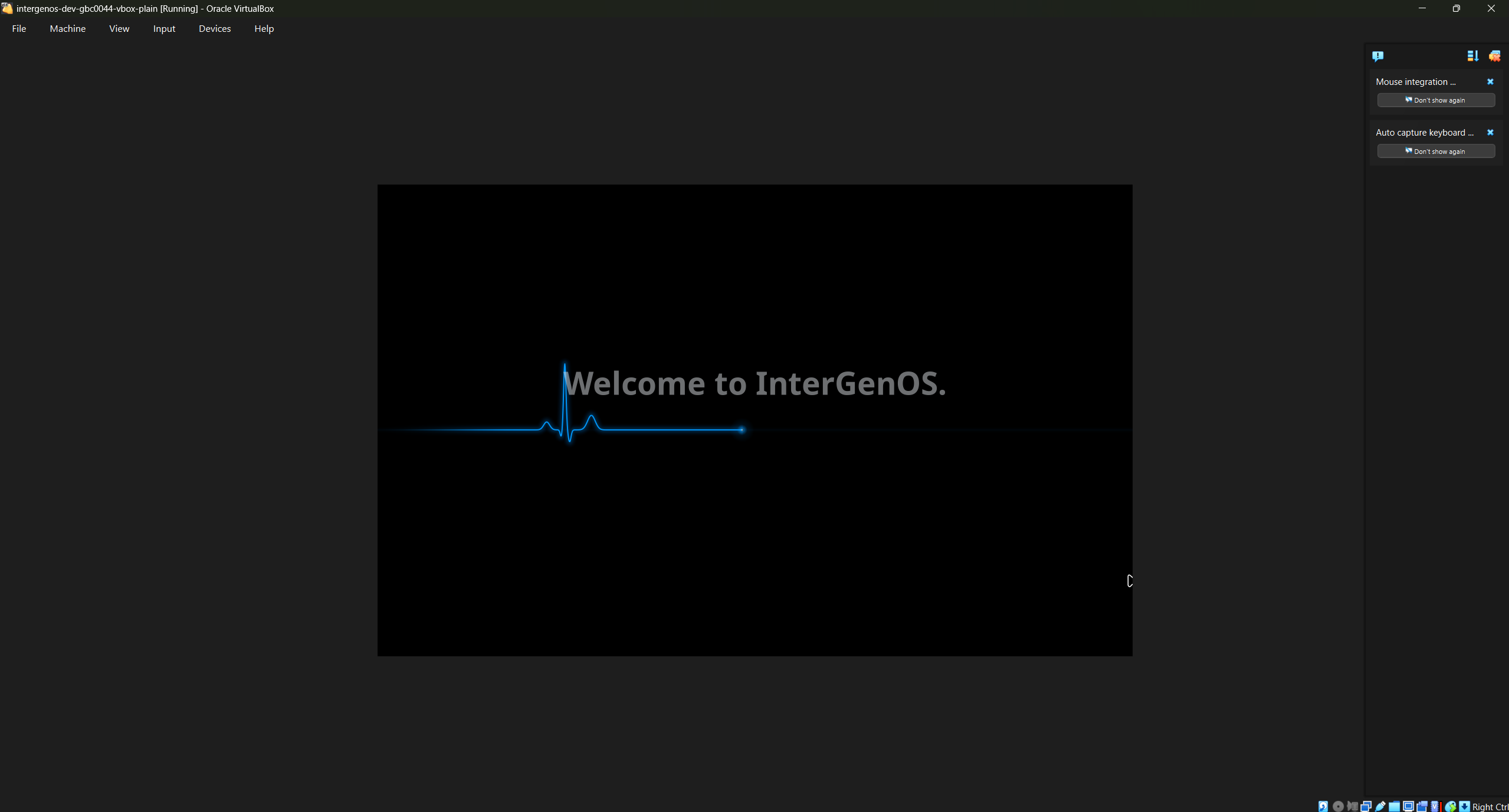
A plain (unencrypted) install reaching its first-run welcome under enforced Secure Boot — captured in a VM so you can reproduce it yourself. The encrypted leg is identical at this point; only the root volume differs.
Kernel install and upgrade
When you install or upgrade a kernel via the package manager (or any package whose post-install hook touches the kernel), the kernel package’s post_install hook does the following on your machine, with no key material from the InterGenOS release infrastructure:
- Reads the kernel, the standard initramfs (and an additional full-disk-encryption initramfs if your system is LUKS-encrypted — see below), and the canonical command line for your system.
- Runs
ukify buildto bundle them into a single UKI in the systemd-stub envelope. - Runs
sbsign --key /var/lib/intergen/mok/mok.key --cert /var/lib/intergen/mok/mok.crtto sign the UKI. (sbsignreads PEM-format certificates; the.derform generated alongside is for MokManager enrollment only, not signing.) - Writes the signed UKI to
/boot/efi/EFI/Linux/intergenos-<kernel-version>.efi. - Updates the GRUB menu so the new kernel is the default boot entry.
- Retains a configurable number of old kernels (default: 2) and their UKIs as fallback entries.
The InterGenOS release signing key, used on the offline workstation, is never asked. It physically does not exist on your machine.
If signing fails (corrupt key file, full ESP, and so on), the hook falls back to writing the kernel and initramfs out separately for GRUB to load directly. You do not end up with a system that has a half-installed kernel.
ESP sizing
Because every kernel you install becomes a UKI in /boot/efi, the ESP needs headroom for several generations of kernel. A typical UKI is 80–150 MB depending on the initramfs payload. Forge creates a fixed 1 GiB EFI System Partition during partitioning, which leaves room for several kernels plus their fallbacks.
If your ESP fills up, kernel install fails. The hook prints a clear message; you can clean up old kernels by removing the older kernel package with the package manager to free space.
Composition with LUKS encryption
If you choose the encrypted-install option, Forge installs a small full-disk-encryption initramfs alongside the kernel: busybox plus cryptsetup, just enough to prompt for your LUKS passphrase and unlock the root volume before the kernel hands off to userspace.
That FDE initramfs is bundled into the same UKI as the kernel. The UKI signature covers it, just as it covers the kernel and the command line. There is one signature; verifying the UKI signature verifies the entire boot path including the LUKS unlock prompt.
If you opt for TPM2-sealed unlock (an experimental feature not offered by the installer in this release — see Disk Encryption & LUKS), the same UKI envelope holds the additional bits that talk to your TPM. The unlock path is still inside the signed envelope.
For non-encrypted installs, the UKI’s bundled initramfs is minimal — typically only CPU microcode — because all storage and filesystem drivers are built into the kernel.
See Disk encryption for the full LUKS setup walkthrough.
Recovery
Most of the time you will never think about any of this. When something goes wrong, you have several recovery paths.
“A new kernel won’t boot”
GRUB retains the previous kernels and a bare-vmlinuz recovery entry. Pick a known-good entry from the GRUB menu to get back into a working system, then reinstall or roll back the kernel package with pkm.
“I need to regenerate the MOK”
The MOK material lives under /var/lib/intergen/mok/. Reinstalling with Forge generates a fresh MOK; a subsequent kernel install or upgrade rebuilds the UKIs with it. (There is no separate recovery wrapper command — UKI signing is handled entirely by the kernel package’s post-install hook.)
“I want to run an unsigned kernel for testing”
On a default install (Secure Boot off) nothing stops you, but the supported path is to build your kernel, sign it with your MOK using sbsign, and install it through the package manager like everything else, so the machinery stays consistent for the day you enable Secure Boot.
See Recovery for the broader recovery toolkit.
Troubleshooting
| Symptom | Likely cause | Fix |
|---|---|---|
| New kernel installs but won’t boot | UKI signing failed, or (with Secure Boot on) the MOK is not enrolled | Boot the previous kernel or recovery entry from the GRUB menu; inspect /var/log/intergen-kernel-postinstall.log. |
| GRUB menu shows only the recovery entry, no UKI entries | UKI signing has been failing silently | Inspect /var/log/intergen-kernel-postinstall.log. A full ESP and a missing MOK key file are the two common causes. |
ukify or sbsign is missing | The UKI tooling packages were removed | Reinstall the systemd tooling and sbsigntool with the package manager and re-run the kernel post-install hook for the current kernel. |
| Secure Boot toggle in firmware is greyed out | Some firmware (especially OEM laptops) makes Secure Boot read-only outside Setup Mode | See your hardware vendor’s documentation. InterGenOS runs fine with Secure Boot off; enabling it is optional. |
Where this fits in the build
The signed boot chain is not bolted on at the end. The candidate build runs its phases with the boot-chain artifacts produced and sealed in the late stages: the bootloader phase, the image and squashfs phases, and the UKI/verity phase that bundles and integrity-seals the kernel images before the ISO is assembled. The build halts twice for operator hardware-token signing: once to sign the install-integrity archive manifest (before the system image is built), and once — after the squashfs is assembled — to sign GRUB and all three unified kernel images (the live UKI plus the graphical and text installer UKIs) in a single token session.
A candidate is never trusted on the strength of a clean build alone. Pre-install evaluation boots the ISO on real hardware and examines the signed chain and the live image’s integrity before any install is attempted. Verification you can check yourself is the standard the boot chain is held to.
This is the InterGenOS boot model. The desktop that ships today is GNOME 49 on Wayland.